
QuickResize
Resize an entire InDesign document to any dimension!
QuickResize provides a simple, convenient way to resize an entire document, and everything in it, to whatever new size you like.
Here are a couple of testimonials, including what Scott Citron, award-winning graphic designer, Adobe Press author, and Head of the New York InDesign Users Group has to say about QuickResize:
Description
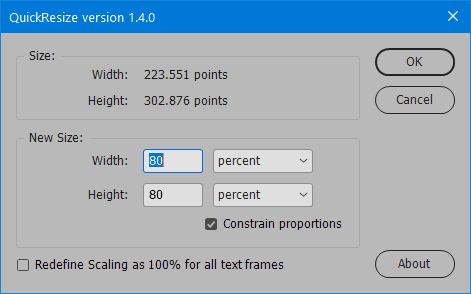
QuickResize presents a simple window where you can input the new size you’d like the current InDesign document to be.
The new size can be specified in any units, or as a percentage of the current size. The new size doesn’t even have to maintain the old document proportions – so you can make a new document that is 50% narrower than the current one, if you like.
QuickResize is super-easy to use. It does not use InDesign’s new “page tool”, which can cause irritating mismatches in page sizes. Nor does it require any use of the complicated “liquid layout” or “alternative layout” features. It simply resizes the current document to whatever size you choose.
QuickResize does not work by creating a PDF of your document and then placing that into a new document. It works by perfectly resizing every element in your document to the new dimensions, meaning that all text and graphics remain fully editable after the resize.
Here’s a screenshot of the script window:
The geeky stuff …
QuickResize works by scaling every item in the InDesign document. This is equivalent to Ctrl-Shift-dragging the corner of all pages items in the document to scale them. (It also modifies the page size and baseline grid, and anything else necessary.)
QuickResize applies the “When scaling: adjust scaling percentage” option to all transformations. This ensures the most accurate resizing possible. However, in versions prior to InDesign CC2014, the drop shadow and gradient feather effects do not scale properly. This is an InDesign bug that is fixed in the latest versions. So if your document uses these effects and you need them to scale perfectly, only the Creative Cloud version of InDesign will do!
For more information about how effects scale, see these article: http://indesignsecrets.com/scaling-effects.php and http://indesignsecrets.com/improved-scaling-effects-indesign-cc-2014.php.
Another side-effect is that the text in text frames will display with a size in parenthesis – e.g., 14pt (21pt). To get rid of the parenthesis, select the text frame, go to the flyout menu of the Control Panel, and select “Redefine scaling as 100%”. However, be warned: owing to various InDesign bugs (or limitations), selecting this option can cause text to reflow or acquire some weird formatting – which is why QuickResize does not do this by default. However, the option is available if you need it. Read on to find out more…
New in Version 1.4.0: Redefine Scaling as 100% for all text frames
Since version 1.4.0, QuickResize provides the option to redefine scaling as 100%.
If this option is selected, all text frames in the document that have been resized will be reset so that their new size shows as 100% in InDesign’s Control panel.
This has the advantage that when text is selected in a resized text frame, the point size will not show up in parentheses as mentioned above. Obviously, this makes it less confusing to adjust and edit text afterwards.
However, as mentioned above, the side-effects of enabling this new option are that text can reflow or acquire weird formatting. So use with care, and, if utmost fidelity to the original unresized document is crucial, do not enable this option!
Download a Free Trial
Click here to download a free trial of QuickResize for InDesign. The trial version works just like the full version, but will randomly adjust the target dimensions by ±15%. With the trial version, you should be able to get a good idea of how the script works and what the final, resized version of your document will look like, but you won’t be able to modify your document to precisely the size you need.
Instant Download
To purchase the full version of QuickResize for only $59, click the “Buy Now” button. Your product and serial numbers will be available for instant download when you complete the purchase.
Money-back Guarantee
If you are not satisfied with Quick Resize for any reason, simply let us know within 30 days of purchase for a full refund.
Steven Hiatt
May 3, 2023 11:12 pmCan I resize a document without any rescaling of its contents elements?
I’m redoing a book from several years ago in a different size–it’s understood that the text will have to reflow to some extent, and the index reviewed/updated.
I’ve found that InDesign’s Document Setup/Adjust Layout routines simply don’t work–the old page sizes remain as though set in stone.
Ariel
May 3, 2023 11:14 pmHi Steven,
I would recommend downloading the trial version. You’ll quickly get a feel of exactly what it does that way.
But if I’ve understood correctly, and you are just looking to change the page dimensions without modifying the content in any way, you don’t need a script for that – just change the page size in InDesign’s Document Setup dialog?
Ariel